
The FBA deal analyser, built in

The Amazon FBA deal analyser for UK sellers

Scan a barcode or drop in an ASIN and retailscout tells you whether it's worth buying, before you buy it: live sales, the Buy Box, every Amazon fee, your profit and ROI, a Scout AI buy score, full history charts and risk alerts. It's a built-in SellerAmp, BuyBotPro and ProfitGo alternative.

7-day free trial, then £14.99/month · Cancel anytime
No charge today Secure checkout by Stripe No extra charges
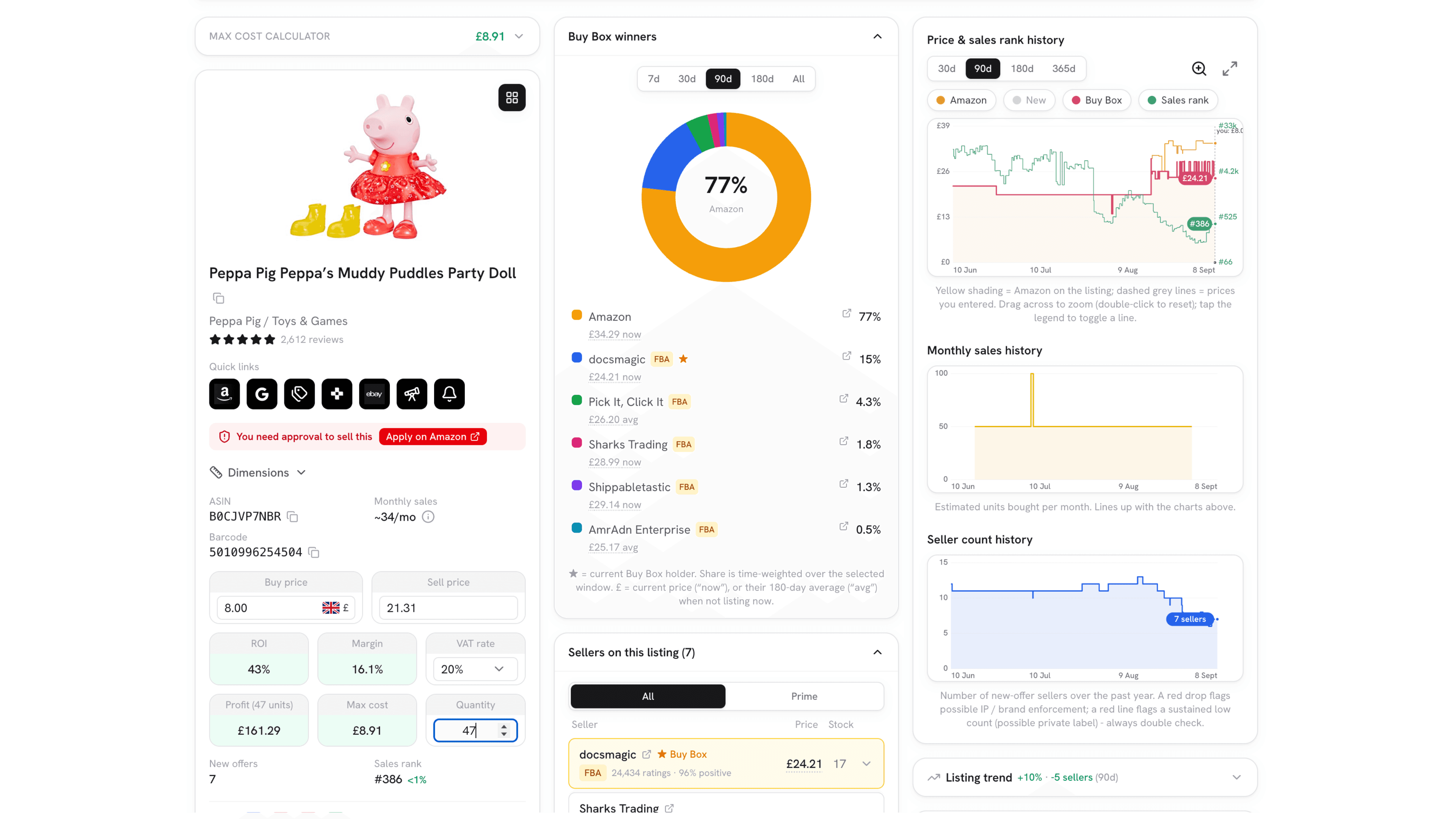
The retailscout deal analyser on a Peppa Pig toy: max cost calculator at 8.91, buy and sell price with 43 percent ROI and 161.29 profit, an approval-needed warning for the listing, a Buy Box winners chart with Amazon holding 77 percent, the seven sellers on the listing with their prices, and price, sales rank, monthly sales and seller count history charts.

Every metric on one screen: sales, Buy Box, fees, profit, ROI, a buy score and full history.

On your phone, your desktop, or any online store

Scan a barcode in the aisle on your phone, dig into a deal in the web app on a bigger screen, or click the browser extension on any online retailer to analyse the listing you're viewing, it reads the title and lets you right-click any price to set your buy or sell. It's the same analyser, wherever you work.
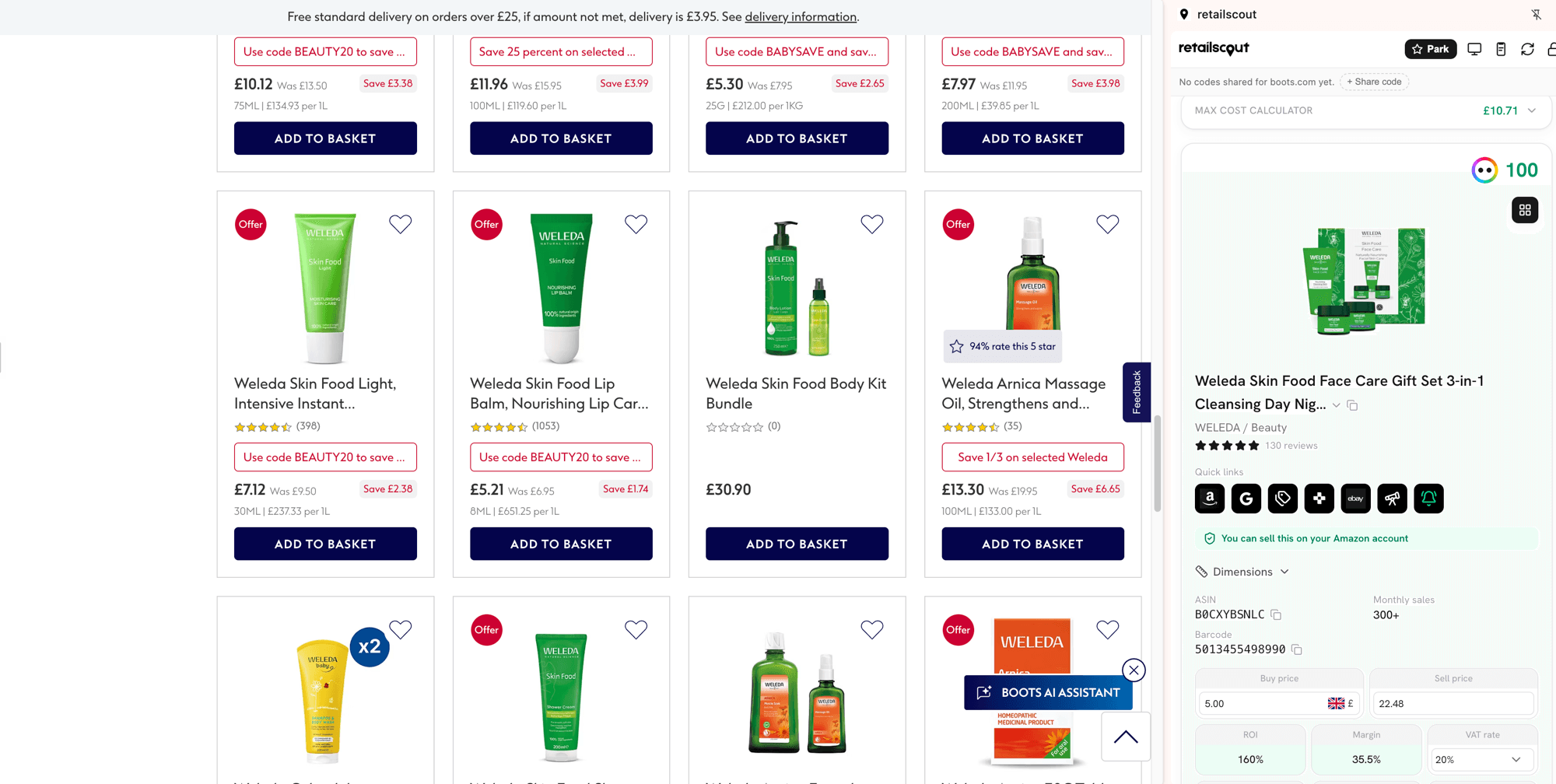
The retailscout browser extension open in a side panel beside a Boots product listing, showing the max cost calculator, the product's ASIN, barcode and monthly sales, the buy and sell price with ROI and margin, and a check that it can be sold on your Amazon account.

Everything the analyser does

One product, every answer. Here's what you get on every deal.

Scan a barcode, search an ASIN, or analyse any listing

  • In-store barcode scanner, iPhone and Android
  • AI photo scanner for hidden barcodes
  • ASIN and product-name lookup on desktop
  • Extension reads titles on any retailer site
  • Right-click a price to set buy or sell
  • Multi-scan mode to triage a whole shelf
How it works

Point your phone at a barcode in the aisle and the product loads in seconds, no typing. Barcode hidden under a reduced-to-clear sticker? Snap the front of the pack and the AI scanner reads the product for you. Prefer to work at a desk? Paste an ASIN or search by name. Doing online arbitrage? Click the browser extension on any online retailer's product page and it reads the title straight in, then right-click any price on the page to set it as your buy or sell price, no copy-pasting. Sourcing a whole shelf at once? Multi-scan mode queues every barcode you scan and lets you triage the winners afterwards.

Every number you need, pulled live

  • Estimated monthly sales and sales rank
  • Buy Box now and over 30 / 90 / 180 days
  • New-offer (seller) count
  • Amazon referral fee and FBA fee
How it works

Behind every product is live market data so you are never guessing. See estimated monthly sales and the current sales rank, the current, 30, 90 and 180-day Buy Box, how many other sellers are on the listing, and Amazon's referral fee and FBA fee for that item. It is the full picture a deal analyser should give you, in one screen.

Profit and ROI on your own costs

  • Your cost, quantity and prep in your own numbers
  • FBA or FBM, VAT settings per item
  • Sell against the current, 30, 90 or 180-day Buy Box
  • A transparent fee breakdown, not a black box
How it works

Type in what you paid and the profit calculator does the rest. Pick which Buy Box window to sell against, choose FBA or FBM, set whether you are VAT-registered and the item's VAT rate, add storage months and quantity, and it returns your estimated profit and ROI with a full fee breakdown. Change a number and everything updates instantly, so you can pressure-test a deal in seconds.

Know your maximum buy price before you buy

  • Set your minimum ROI once
  • See the exact max cost to hit it
  • Switch between now, 30, 90 and 180-day Buy Box
How it works

Set the minimum ROI you are willing to accept and the max cost calculator works backwards: it tells you the most you can pay for a unit and still hit your target, at any Buy Box window, with your fees already deducted. Walk the aisle knowing your number, so a red-sticker price is an instant yes or no.

Scout AI: a buy score out of 100

  • A 0 to 100 buy score on every product
  • Weighs ROI, demand, competition and Buy Box
  • "Explain my score" shows what's dragging it down
How it works

Not sure if a deal is worth it? Scout AI scores every product from 0 to 100, weighing ROI, demand, the number of competing sellers and how stable the Buy Box has been. A quick glance tells you "strong buy" or "avoid". Tap Explain my score and it highlights exactly which factor is holding a deal back, so you learn what a good deal looks like as you go.

Full price, sales and seller history

  • Price, Buy Box and sales-rank history
  • Monthly sales and seller-count history
  • Amazon-on-the-listing shading
  • Drag-to-zoom and a crosshair on every chart
How it works

Read a listing's story the way the pros do. Interactive charts plot the Amazon, New and Buy Box price alongside sales rank, plus estimated monthly sales and the seller count over the past year. Shading shows when Amazon was on the listing. Drag to zoom into any period and scrub across to read the exact value on any date.

Risk alerts before you commit

  • Oversupply and temporary-dip detection
  • Possible IP / brand-gating warnings
  • Amazon-on-the-Buy-Box flag
  • Variations, hazmat and oversize alerts
How it works

The fastest way to lose money is a deal that looks good but isn't. retailscout flags the traps automatically: an oversupply spike where a flood of sellers has temporarily tanked the Buy Box (a dip that will recover, not a real price), possible IP or brand-gating signals, Amazon sitting on the Buy Box, and variations, hazmat or oversize items. You see the risk before you spend a penny.

Can I sell this? Amazon's own answer, for your account

  • Amazon's own answer, for your own account
  • Sell now, approval needed, or restricted
  • The approval link straight into Seller Central
  • A brand scan before the trip, not after the invoice
  • Read-only, and you can disconnect any time
How it works

A 60 percent ROI on a brand you are gated out of is not a deal. Connect your Amazon selling account and retailscout checks whether you can list a product before you buy it. This is not a warning inferred from the data like the gating signals above: it is Amazon's answer for your account, and it comes back as sell it now, approval needed, or restricted. Where approval is needed you get the link straight into Seller Central to apply. Eligibility is decided per selling account, so two sellers scanning the same barcode in the same aisle can get different answers, which is why a screenshot from someone else proves nothing about yours. Before a trip, the brand scan runs a representative list of brands through the same check and sorts them into what you can sell now, what needs approval and what is closed to you, so you know which lines are yours before you drive anywhere. The connection is read-only: retailscout never lists, never reprices and never acts on your account, and you can disconnect it in Settings whenever you like. Eligibility checks are included with every paid membership and start when your trial converts.

Live stock, and how long it'll take you to sell

  • Live units in stock across the sellers in play
  • Overstocked or understocked at a glance
  • Your sell-through time on your quantity
  • Amazon's deep stock accounted for
How it works

A profitable deal you can't actually sell is a dead deal. retailscout shows the live stock on a listing and, more importantly, how long it'll take you to sell through it. It counts the units in play across sellers, calls whether the listing is overstocked or understocked, and estimates your own sell-through from your buy quantity and the price you'd sell at, because buyers take the cheapest stock first, so pricing above the lowest pushes your timeline out. It reads Amazon sensibly too: when Amazon is on the listing with its deep stock it won't cry "understocked", and it discounts the share of sales Amazon wins so your numbers stay realistic. Sales are smoothed over three months so a one-off spike doesn't mislead you.

Know exactly who you're up against

  • Buy Box winner share
  • Every seller, sorted cheapest-first
  • FBA or FBM tag on every seller and winner
  • Seller feedback and review counts
How it works

Competition decides whether you actually sell. See the split of who has been winning the Buy Box, and the full list of sellers on the listing sorted cheapest-first, with each seller's feedback and review counts. Every seller and Buy Box winner is tagged FBA or FBM, so you can see at a glance how much of the field is Prime. It's the difference between a listing you can win and one that will sit.

Use it in the aisle, at your desk, or on any retailer's site

  • On your phone: scan in-store from home screen
  • On desktop: the full analyser on a larger screen
  • In your browser: the extension on any retailer
How it works

It's a web app, so there's no app store download. Add retailscout to your phone's home screen and scan in-store, open the full analyser on a bigger screen for deeper work, or use the Chrome extension to analyse the listing you're already viewing, on Amazon or on any online retailer's product page. Your history syncs across all of them.

A built-in SellerAmp, BuyBotPro and ProfitGo alternative

Most sellers pay for a sourcing app, a separate deal-analysis subscription, and the market data that feeds it. retailscout puts the lot in one place: the same app where you find UK stores and plan your driving route also analyses every deal on live data, your own fees and a Scout AI buy score. One membership at £14.99 a month covers all of it, market data and history charts included, with no tiers and nothing to bolt on.

Deal analyser FAQ

What is an FBA deal analyser?

It's a tool that tells you whether an Amazon product is worth buying to resell. You give it a product (by barcode or ASIN) and your cost, and it returns live sales data, the Buy Box price, Amazon's fees, and your estimated profit and ROI, so you can decide before you buy. retailscout has one built in.

Is retailscout a SellerAmp, BuyBotPro or ProfitGo alternative?

Yes. retailscout includes a full deal analyser: live sales, sales rank, Buy Box across four windows, every Amazon fee, your profit and ROI on your own cost, prep and VAT settings, plus a Scout AI buy score and history charts. For most UK sellers it replaces a separate deal-analysis subscription.

Do I need to pay for anything else on top?

No. One membership covers everything the analyser runs on: the market data, the price, Buy Box and sales-rank history, the full Amazon fee breakdown and the Scout AI score. There are no tiers and no add-ons to buy, so the membership is the whole cost of analysing your deals.

Does it calculate my exact profit and ROI?

It gives an accurate estimate based on your own cost, quantity, prep, VAT setting and the current Amazon fees. Fees can change, so we always recommend a final check in Amazon's own fee tools before buying at volume.

Can I check whether I'm allowed to sell a product before I buy it?

Yes. Connect your Amazon selling account and retailscout checks your listing eligibility on every product you analyse, so you see whether you can sell it now, need approval first, or are restricted, with the approval link where you need one. Gating is decided per account, so this is your answer rather than a general one. The connection is read-only and you can disconnect it in Settings at any time. Eligibility checks come with every paid membership and start when your free trial converts.

Does it show how much stock is on a listing?

Yes. The Live stock panel counts the units in play across the sellers on a listing, tells you whether it's overstocked or understocked, and estimates how long your own stock would take to sell through, based on your buy quantity and where you price. It also accounts for Amazon's deep stock and Buy Box share, so a listing Amazon backstops isn't wrongly flagged as a quick win.

Can I use it in-store on my phone?

Yes. Add retailscout to your phone's home screen and scan barcodes right there in the aisle to analyse a deal on the spot. No app store download needed.

How much does it cost and is there a free trial?

It's a single membership with a 7-day free trial. You won't be charged until the trial ends, and if you cancel before then you pay nothing.

Analyse your next deal in seconds

Stop guessing and start calling every deal on the numbers. Join retailscout free for 7 days.

7-day free trial, then £14.99/month · Cancel anytime

No charge today Secure checkout by Stripe No extra charges

See what members found last week

A free email on Thursdays: the count of finds members logged, and the two best with the estimated profit per unit after Amazon fees. No trial, no card.

Read a sample report

We'll ask you to confirm your address. Unsubscribe in one click, any week.